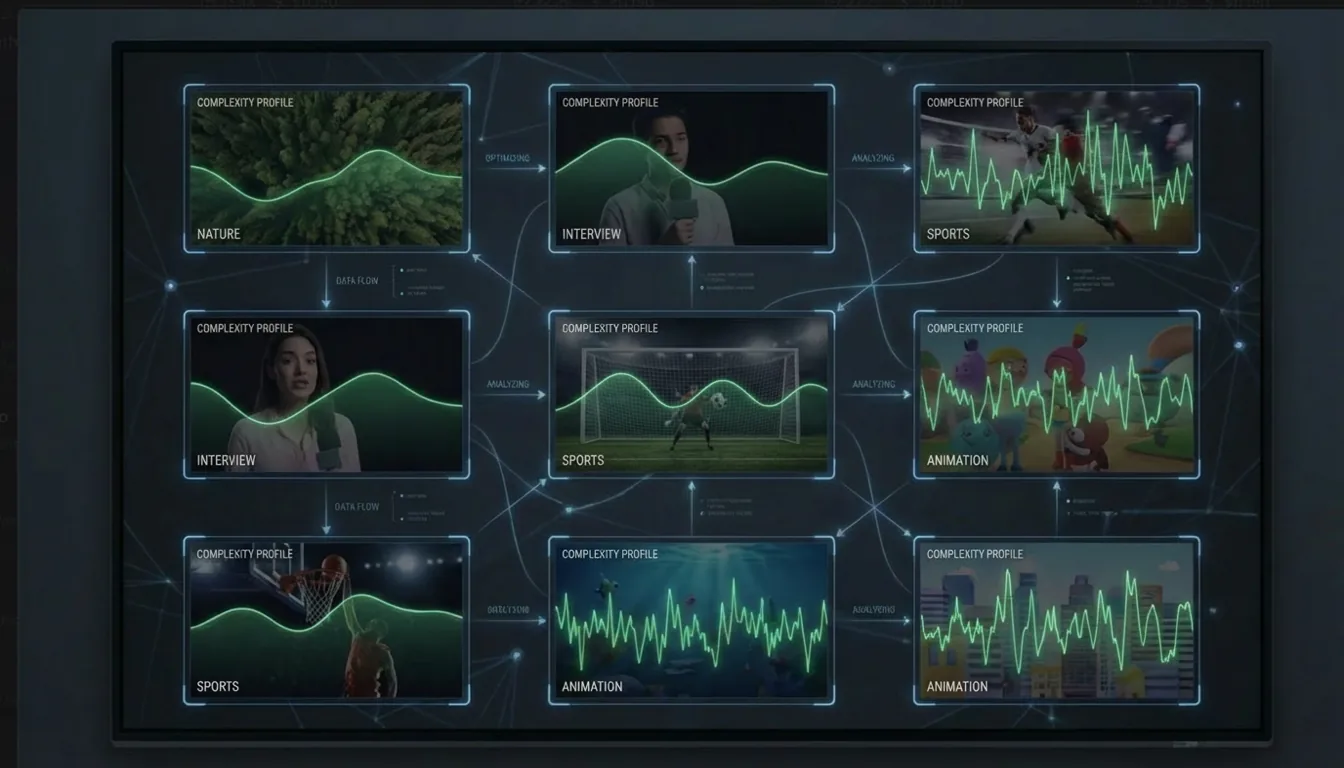
Per-Title Encoding Explained: Content-Aware Compression That Saves 20-50% on Bandwidth
Per-title encoding analyzes each video's complexity to generate optimal bitrate ladders — saving 20-50% on bandwidth without sacrificing quality.
Availability note (September 2026). Per-title encoding is available on Transcodely, since 15 September 2026:
content_aware.mode = per_titleon an output tunes the encode to that source against a VMAF target, at a 1.5× multiplier charged only when the search actually chose the CRF. Auto-ABR ladder generation is not: a job that setscontent_aware.mode = auto_abris rejected at job creation with error codeparameter_unsupported, because it would change the number of renditions after the job was already quoted per rendition. Where this post describes auto-ABR, read the technique rather than something you can switch on. The content-aware API reference is the current state and the pricing page lists what you can buy right now.
Every video encoding pipeline makes a fundamental tradeoff: quality versus file size. For most of the streaming era, that tradeoff was made once — a single set of encoding parameters applied uniformly to every video in a catalog. The same bitrate ladder used for a static cooking tutorial was also used for a high-action sports highlight reel.
This is an enormous waste of bandwidth and money. Per-title encoding fixes it by analyzing each video individually and generating encoding parameters optimized for that specific content.
The fixed ladder problem
A traditional adaptive bitrate (ABR) ladder might look like this:
| Variant | Resolution | Bitrate (H.264) |
|---|---|---|
| 1 | 480p | 1.0 Mbps |
| 2 | 720p | 2.5 Mbps |
| 3 | 1080p | 5.0 Mbps |
| 4 | 1080p | 8.0 Mbps |
This ladder gets applied to every video in the catalog — a podcast recording, a nature documentary, a live concert, a video game stream. The problem is immediately obvious: these four types of content have radically different compression characteristics.
A podcast recording with a single speaker against a static background has almost no spatial or temporal complexity. At 5 Mbps 1080p, it is indistinguishable from the uncompressed source. You could drop to 2 Mbps and most viewers would never notice. Every megabit above that threshold is wasted bandwidth — money spent on bits that contribute nothing to perceived quality.
A nature documentary with slow panning shots across detailed landscapes has moderate complexity. The 5 Mbps allocation might be reasonable, but the 1.0 Mbps 480p variant is likely over-provisioned for how simple the content becomes at that resolution.
A live concert with strobe lighting, smoke effects, and rapid camera cuts has extreme temporal complexity. At 5 Mbps, the 1080p encode will show blocking artifacts during the most intense scenes. The fixed ladder is under-provisioning exactly where quality matters most.
A single fixed ladder cannot serve all three scenarios well. It over-allocates for simple content and under-allocates for complex content simultaneously.
What is per-title encoding?
Per-title encoding (also called content-aware encoding) solves this by analyzing each video’s unique characteristics before encoding, then generating a custom bitrate ladder tailored to that specific piece of content.
The analysis phase measures several properties of the source video:
- Spatial complexity — how much detail exists in individual frames (texture, edges, fine patterns)
- Temporal complexity — how much change occurs between frames (motion, scene cuts, camera movement)
- Texture density — the distribution of high-frequency visual information across the frame
- Scene change frequency — how often the visual content shifts dramatically
- Color gradient complexity — the smoothness or abruptness of color transitions (affects banding artifacts)
Based on this analysis, the encoder determines the optimal CRF (Constant Rate Factor) value to achieve the target VMAF score for that specific content. Simple content gets a higher CRF (more compression, lower bitrate) while complex content gets a lower CRF (less compression, higher bitrate). The quality target remains constant — only the bitrate needed to reach it changes.
The result for a podcast recording might look like:
| Variant | Resolution | Bitrate (per-title) | Fixed ladder equivalent |
|---|---|---|---|
| 1 | 480p | 0.4 Mbps | 1.0 Mbps |
| 2 | 720p | 1.0 Mbps | 2.5 Mbps |
| 3 | 1080p | 2.0 Mbps | 5.0 Mbps |
Same quality. Half the bitrate. Half the CDN cost.
For an action-heavy sports highlight, the same analysis might produce:
| Variant | Resolution | Bitrate (per-title) | Fixed ladder equivalent |
|---|---|---|---|
| 1 | 480p | 0.8 Mbps | 1.0 Mbps |
| 2 | 720p | 2.8 Mbps | 2.5 Mbps |
| 3 | 1080p | 6.5 Mbps | 5.0 Mbps |
Here, per-title encoding actually allocates more bitrate than the fixed ladder for the 1080p variant — because the analysis determined that this content needs 6.5 Mbps to hit the quality target. The fixed ladder’s 5 Mbps would have produced visible artifacts.
Per-title encoding does not always reduce bitrate. It optimizes bitrate — using less where possible and more where necessary to maintain consistent quality.
The Netflix origin story
Netflix pioneered and popularized per-title encoding in a landmark 2015 blog post titled “Per-Title Encode Optimization.” The engineering team, led by Anne Aaron, published their approach and the results were striking.
By analyzing the complexity of each title in their catalog and generating optimized encoding parameters per video, Netflix achieved:
- 20% average bitrate reduction across their entire catalog
- Up to 50% reduction for visually simple content like animated shows and talk shows
- Consistent quality as measured by VMAF — the bitrate dropped, but the perceived quality stayed the same or improved
For Netflix, operating at a scale of hundreds of millions of viewing hours per month, a 20% reduction in bitrate translated directly into massive CDN cost savings and improved streaming quality for viewers on bandwidth-constrained connections.
The publication catalyzed the entire industry. Within two years, every major streaming platform had either built or begun building their own per-title encoding pipeline. Today, per-title encoding is considered a baseline capability for any serious video platform — not a differentiator, but table stakes.
Real-world savings by content type
The savings from per-title encoding vary significantly based on content complexity. Content that is “easy” to compress benefits the most, because fixed ladders over-provision the most for simple content.
| Content type | Spatial complexity | Temporal complexity | Typical bitrate reduction | Example |
|---|---|---|---|---|
| Interviews, lectures, podcasts | Low | Very low | 40-50% | Single speaker, static background, minimal movement |
| Animation, cartoons | Low-Medium | Low-Medium | 35-45% | Flat colors, clean edges, predictable motion |
| Drama, narrative film | Medium | Medium | 20-30% | Indoor/outdoor scenes, dialogue, moderate movement |
| Documentaries, tutorials | Medium | Medium | 20-30% | Mixed content, some b-roll, moderate complexity |
| Music videos, concerts | Medium-High | High | 15-20% | Rapid cuts, lighting effects, crowd scenes |
| Live sports, esports | High | Very high | 10-15% | Fast motion, unpredictable movement, detailed crowds |
| Action films, gaming content | Very high | Very high | 10-15% | Explosions, particles, rapid camera movement |
The weighted average across a typical mixed-content catalog is 25-35% bitrate reduction. Platforms with a higher proportion of simple content (education, corporate video, podcasts) will see even larger savings.
Beyond per-title: auto-ABR ladders
Per-title encoding optimizes the bitrate at each rung of the ladder. But there is a second optimization opportunity: determining the right number of rungs.
A standard ABR ladder might include 8 variants — from 240p at 200 Kbps up to 4K at 16 Mbps. But not every video benefits from 8 variants. A 30-second product demo does not need a 4K variant. A screen recording with text content does not need rungs below 720p because the text becomes illegible at lower resolutions.
Auto-ABR ladder generation extends per-title encoding by automatically determining:
- The optimal number of variants — eliminating rungs that add storage and encoding cost without meaningfully improving the viewer experience
- The right resolution for each rung — choosing resolutions where quality transitions are most perceptible to viewers
- The convex hull — the set of resolution/bitrate combinations that maximizes quality per bit across all possible network conditions
For example, auto-ABR analysis might determine that a particular video looks virtually identical at 720p and 1080p when both target VMAF 93. In that case, the 1080p variant is dropped entirely — it would consume 60% more bandwidth while providing no perceptible quality improvement. The viewer on a 3 Mbps connection gets bumped straight from 720p to 1440p or higher, skipping the wasteful middle ground.
Auto-ABR consistently reduces the number of variants by 20-30% compared to a fixed ladder while maintaining the same viewer experience across all network conditions. Combined with per-title bitrate optimization, the total savings can reach 40-60% for simple content.
The ROI math
Per-title encoding has a cost — the analysis phase adds computation time and encoding complexity, which increases the per-minute encoding price. But the ROI is straightforward because the savings come from CDN bandwidth, which is a recurring cost that dwarfs one-time encoding costs.
Consider a video platform with these characteristics:
- Catalog: 10,000 videos, average length 20 minutes
- Monthly views: 1 million hours watched
- Average bitrate: 4 Mbps (fixed ladder)
- CDN cost: $0.01 per GB
Monthly CDN cost without per-title encoding:
1,000,000 hours x 3,600 seconds x 4 Mbps = 14,400 Tb = 1,800 TB
1,800 TB x $0.01/GB = $18,000/month
Monthly CDN cost with per-title encoding (30% bitrate reduction):
1,800 TB x 0.70 = 1,260 TB
1,260 TB x $0.01/GB = $12,600/month
Monthly savings: $5,400
The one-time encoding cost for per-title optimization across 10,000 videos at 20 minutes each is a fraction of the recurring monthly savings. For most platforms, per-title encoding pays for itself within the first month of CDN cost reduction — and continues saving money every month thereafter.
For platforms with higher traffic volumes, the math becomes even more compelling. A service delivering 10 million hours per month saves $54,000 monthly. At 100 million hours, savings exceed half a million dollars per month.
How per-title encoding works with Transcodely
Enabling it is one field on an output: set content_aware.mode to per_title and the search happens server-side. You declare the ladder you want; Transcodely finds the CRF this source needs to reach the VMAF target and encodes that ladder at it. The rendition count never changes, which is why the price quoted at create still holds.
The search runs once per output, on the ladder’s highest-resolution quality-driven rendition — at most four sample encodes of at most fifteen seconds each — and the lower rungs move with it by the CRF offsets your ladder already declares. vmaf_target accepts 80 to 97 and defaults to 93, on every quality tier.
Basic per-title encoding
{
  "outputs": [
    {
      "type": "hls",
      "video": [
        {"codec": "h264", "resolution": "1080p", "quality": "standard"},
        {"codec": "h264", "resolution": "720p", "quality": "standard"},
        {"codec": "h264", "resolution": "480p", "quality": "standard"}
      ],
      "content_aware": {"mode": "per_title"}
    }
  ]
}
Per-title encoding applies a 1.5x multiplier to the base encoding price, once per output rather than once per rung. At Transcodely’s 1080p H.264 rate of EUR 0.01/min, per-title encoding costs EUR 0.015/min. For a 20-minute documentary episode, that is EUR 0.30 in encoding cost — likely saving several dollars per month in CDN costs for even modestly viewed content.
The multiplier is only charged when a search actually ran. If the search cannot run, the encode falls back to the quality tier’s own CRF and the output is billed at 1.0x.
Auto-ABR ladder generation
Auto-ABR would add a 1.75x multiplier (inclusive of per-title analysis): analyze the source, determine the optimal resolution ladder, and generate only the variants that meaningfully contribute to the viewing experience — fewer variants, lower storage, lower CDN cost, the same viewer experience.
It is not available. An output with content_aware.mode set to auto_abr is rejected at job creation with parameter_unsupported. The reason is the one thing per-title deliberately does not do: changing the number of renditions would invalidate the quote you already accepted, because a job is priced per declared rendition at create.
Checking per-title results
The output’s report carries what the search decided:
{
  "content_aware": {
    "mode": "per_title",
    "vmaf_target": 93,
    "vmaf_achieved": 93.043,
    "crf_chosen": 27
  }
}
vmaf_achieved is the score the chosen setting reached on the analysis samples, not a measurement of the delivered file — the delivered file is never itself scored. crf_chosen is the highest-resolution rendition’s value; the lower rungs derive from it by the ladder’s fixed offsets. The block is absent on an output whose search never ran, which is the honest reading: that encode used the quality tier’s own CRF, and it is billed at 1.0x.
The numbers above are the real ones from the release validation run on 2026-09-15: a 1080p H.264 output at the default target of 93 landed 93.043 at CRF 27, and the searched file came out at 63.5% of the size of an identical untuned output from the same source. That is one clip, not a promise about your library.
When NOT to use per-title encoding
Per-title encoding is not always the right choice. There are scenarios where the analysis overhead is not justified:
Short clips. The search has a fixed cost — the same four sample encodes whether the source runs two minutes or two hours — while the multiplier is proportional to the encoded duration. Below roughly two minutes the uplift does not cover the machine time, which is why Transcodely refuses a per-title output whose effective encode window is under 120 seconds with per_title_source_too_short. Previews and social clips are better served by a fixed-parameter encode.
Already heavily compressed source material. Per-title encoding works by analyzing the source to determine optimal compression. If the source is itself a low-bitrate compressed file (e.g., a re-encode of a re-encode), the analysis has less signal to work with. The encoder cannot recover detail that was already lost in the source.
Extremely uniform content. Surveillance footage, static security camera feeds, or fixed-angle industrial monitoring — content where every frame looks nearly identical. The complexity analysis will correctly identify this as simple content, but a fixed low-bitrate encode would achieve the same result without the analysis overhead.
Real-time or near-real-time encoding requirements. The content analysis pass adds latency. For live streaming where encoding must happen in real time, per-title optimization is not feasible. However, for live-to-VOD workflows where the recording is re-encoded after the live event, per-title encoding is highly recommended.
For everything else — which covers the vast majority of video-on-demand content — per-title encoding is one of the highest-ROI investments you can make in your encoding pipeline. The combination of guaranteed quality via VMAF targeting and content-aware bitrate optimization via per-title encoding consistently delivers 30-50% bandwidth savings with zero quality compromise. That is money back in your pocket every month, compounding with every hour of video your audience watches.
Try it on your own footage
Upload a clip, pick a ladder, and read the manifest that comes back. Test encodes up to 30 seconds are free.